
Einstein Next Best Action
- johnsontitus
- May 29, 2020
- 5 min read
Updated: May 30, 2020
To set up Einstein Next Best Action, follow these simple steps:
Define a set of recommendations. prerequisite: There should be a flow that is activated. This flow is attached to the recommendation so that it fires when the recommendation is accepted or rejected. Recommendation is found in the list of App launcher. (If its not found, go to the profile and make its tab visible) Its an object like other objects having its own properties, fields, page layout etc. Creating a recommendation creates a record of it. Create a custom field - category to group the recommendations and it helps in using the field in the condition whilst loading into the action strategy.

2.
Create action strategies.
An Action Strategy is mapped to an object, for eg, Case, so it can be selected on that object record.
It is designed by using elements which is similar to flow building.
One can use the following elements:
Load - To load the Recommendation object based on a condition so that recommendation(s) fulfilling the condition will be loaded.
Branch Selector - It is filter that will apply onto the object record that is mapped to the Recommendation. In our eg, its the Case record. So you can set the filter as 'display this recommendation on those case records where its 'Status' is 'Open'. You can refer to the object's child in the filter condition.
Filter - Its filter applies onto the properties of the Recommendation.
Sort - To sort the recommendations in the Strategy based on the Recommendation field in an ascending or descending order.
Limit Reoffers - if you want to take off the recommendation if the user has rejected x number of times and the time period to wait before showing it again.
Map - To pass Recommendation field value(s) as parameters to the flow.
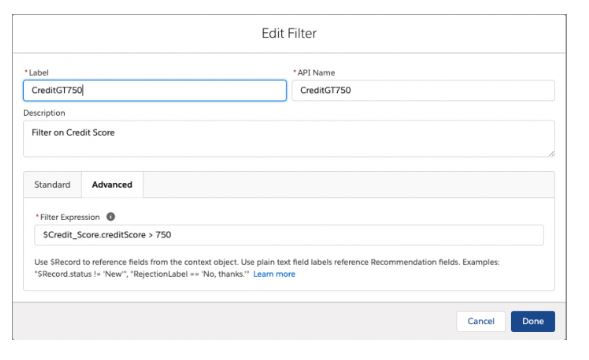
Connection Manager - To get data from external data source or Salesforce using Apex with @Invocablemethod. Its output variable can be used in the Branch Selector in its filter condition. For eg, the Apex API is 'GetStatus' and it has a global class variable - 'creditScore' to assign the output value so in the condition use the expression - $GetStatus.creditScore > 10

3.
Integrate predictive models (optional).
4.
Display recommendations.
In our eg we created recommendations for Case, using the App builder, edit the Case Record page > select the component - Einstein Next Best Action > in its property, select the Action Strategy and Save.
To learn more - https://help.salesforce.com/articleView?id=nba_launch_flow_accepts_rejects.htm&type=5
Use case - Recommend accounts the current user should follow up on today
Suppose you want to recommend the top accounts your salespeople should meet with today because the last interaction was more than 90 days ago. With the Generate element, you can call an Apex Action which does a SOQL query for Accounts where the Owner is the logged in user (the salesperson) and identify those accounts where the last contact date was more than 90 days ago. The relevant accounts can be returned in the form of recommendations.
Solution:
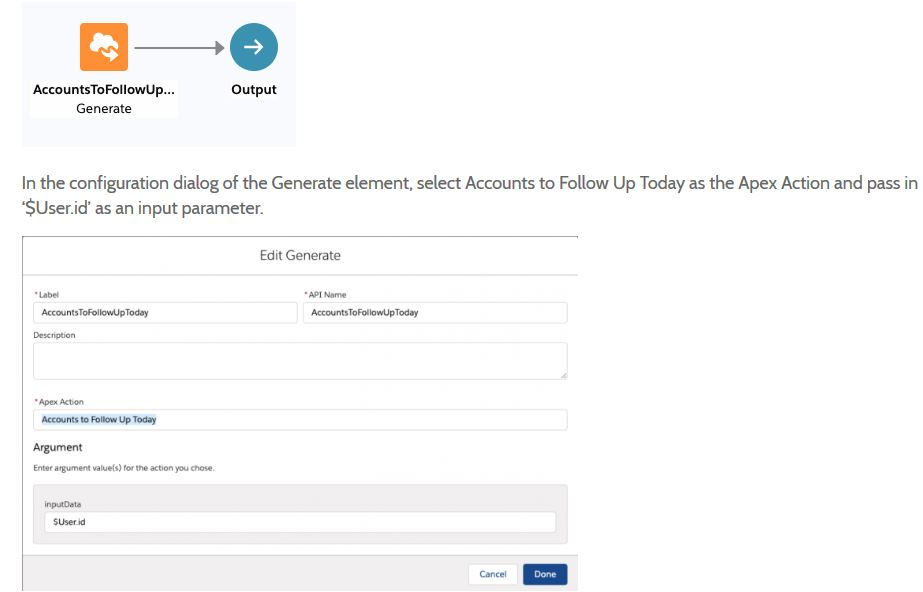
For apex implementation - https://github.com/JohnsonTitus/apxInvocableMethodGetAccounts.git
Use case - You can also use the Generate node to create recommendations for external data sources. For example, consider a scenario where you want to show related Wikipedia pages, as recommendations, for a given topic. The Generate element enables you to call an Apex Action which in turn makes a GET request to a Wikipedia endpoint. The pages are returned in the form of recommendations.
Solution - similar to the above solution.
For apex implementation - https://github.com/JohnsonTitus/apxInvocableMethodWikiPages.git
Enhance
The Enhance element allows you to modify a given set of recommendations on-the-fly, every time the strategy is executed. These recommendations could be static recommendations that live as records in Salesforce or dynamic recommendations sourced from external data sources or other Salesforce objects. For example, you can use the enhance element to calculate a discount % for your customers based on how long the account has been with your company or you can use it as a means for A-B testing two branches of recommendations.
The Enhance element has the following characteristics:
It requires an Apex Action marked as Invocable Method.
@InvocableMethod(
label='Enhance with Discounts Based on Age'
description='Returns an enhanced set of recommendations with appropriate discounts')
IMPORTANT – It can pass any number of inputs to the Apex Action. The input parameter MUST be a list or list of lists of a user-defined Apex object (e.g. a custom class called DataContainer) and the user-defined Apex object MUST include a List<Recommendation> variable. The List<Recommendation> variable will be automatically set with the recommendations flowing into the Enhance element.
global class DataContainer {
    @InvocableVariable
    public string accountId;

    @InvocableVariable
    public List<Recommendation> recommendations;
}
________
global static List<List<Recommendation>> invocableMethod(List<DataContainer> inputData)
It returns a list of recommendations, List<List<Recommendation>>. Note – these recommendation edits are only in-memory and are not persisted after the strategy execution.
global static List<List<Recommendation>> invocableMethod(List<DataContainer> inputData)Use case - Suppose you use Next Best Action to provide upsell recommendations. You’d like to reward your loyal customers by adding a 5 % discount to your product recommendations if the customer has been with your company for more than 1 year, 10% for more than 2 years, and 20% for more than 5 years. With the Enhance element, you can call an Apex Action which does a SOQL query to fetch the Account age and append it to the description of all incoming recommendations.
The strategy with the Enhance element can be as simple as Load → Enhance → Output. All recommendations retrieved or loaded by the Load element are implicitly passed as a list of recommendations to the underlying invocable method.

for Apex implementation - https://github.com/JohnsonTitus/apxInvocableMethodToPrvdDiscDynamically.git
External Connections
External Connections have the following characteristics:
Like Enhance and Generate elements, they work in tandem with an Apex Action created using by adding the Invocable Action annotation to an Apex Class.
Unlike Enhance, External Connections do not take a set of recommendations as inputs. They return a single set of properties that can be referenced in expressions but not mapped to recommendations. Unlike Generate, External Connections do not result in the creation of new, temporary recommendations.
They run before the strategy is processed, and not during the processing of the strategy.
Their values are globally accessible (i.e you can use them in every element of the strategy).
They can return a broad range of different properties (Generate and Enhance always return a List of Recommendations).
Use case - Let’s suppose that you make certain upsell offers to your customers based on their credit-worthiness. For example, you offer them a 0% refinancing only if their credit score is above 750. Credit scores aren’t typically something you would store in Salesforce because they change dynamically and frequently. Using an external connection, you can call an Apex Action which will call an external endpoint and return the credit score given some information about the user.
External Connection:

Comments